

Description
Download Tidepool Uploader – Diabetes, Glucose, Medical Monitoring, USB
Overview
The Tidepool Uploader is a desktop application designed to streamline the process of transferring diabetes-related health data from medical devices to a centralized, secure platform. It serves as a bridge between various glucose monitoring and insulin delivery systems and the Tidepool ecosystem, enabling users to aggregate and analyze their data in one place. This tool is especially beneficial for individuals managing diabetes who use multiple devices, as it consolidates information from disparate sources into a unified view.
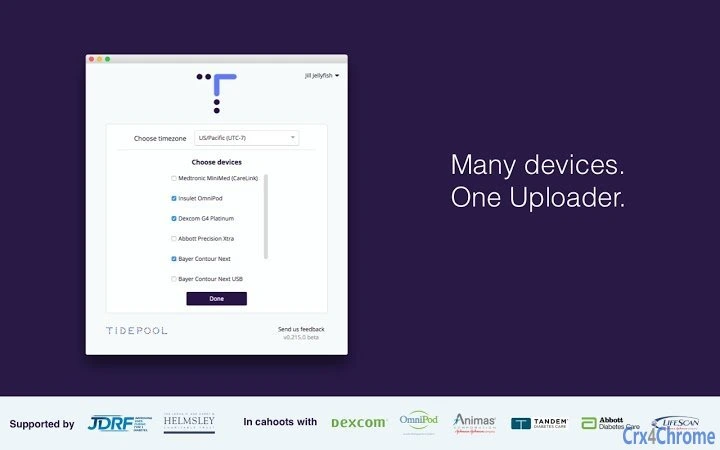
By connecting directly to supported devices such as Dexcom G4 Platinum & G5, Medtronic Paradigm and 530G systems, Tandem t:slim series, Insulet OmniPod, and several Abbott, Bayer, and LifeScan models, the Uploader eliminates the need for manual data entry or switching between multiple platforms. The software facilitates seamless data uploads to the Tidepool platform, where users can access their information through the Blip app. This integration allows for better tracking of glucose trends, insulin usage, and lifestyle factors, supporting informed decision-making in diabetes care.
Target users include people with diabetes, caregivers, and healthcare providers who rely on accurate, comprehensive data for treatment planning. The application is compatible with both Windows and Mac operating systems, making it accessible to a broad audience. While the developer did not provide additional details about the background of Tidepool, the software's adherence to HIPAA guidelines underscores its commitment to data privacy and security. The Uploader operates in the background of daily diabetes management, offering a practical solution for data consolidation and long-term health monitoring.
Key Features & Capabilities
- Device Integration: Supports a wide range of diabetes management devices, including Dexcom G4 Platinum & G5, Medtronic Paradigm 523/723/530G, Tandem t:slim series, Insulet OmniPod, and multiple Abbott, Bayer, and LifeScan models. This allows users to upload data from various systems without needing separate tools for each device.
- Centralized Data Aggregation: Automatically collects data from connected devices and uploads it to the Tidepool platform, enabling users to view all their diabetes information in one place through the Blip app.
- Secure Data Transfer: Ensures encrypted and private data transmission. Only users and those they explicitly invite can access the uploaded data, aligning with HIPAA compliance standards.
- Automatic Syncing: Once a device is connected, the Uploader begins the upload process without requiring constant user input, improving workflow efficiency and reducing the risk of missed entries.
- Platform Compatibility: Designed to run on both Windows and Mac operating systems, offering flexibility for users across different computing environments.
These features are particularly useful for individuals managing complex diabetes regimens. For example, a user with a Dexcom G5 and a Tandem t:slim pump can use the Uploader to sync both systems simultaneously, creating a complete picture of their glucose levels and insulin delivery. Similarly, caregivers can use the tool to collect and review data from multiple patients or family members, facilitating better communication with healthcare providers.
User Interface, Workflow & Performance
The Tidepool Uploader features a minimalistic, task-focused interface designed to prioritize functionality over visual complexity. Navigation is straightforward, with a central dashboard that displays connected devices, upload status, and recent activity. Users are guided through the setup process with clear on-screen prompts, making it accessible even for those with limited technical experience.
Workflow efficiency is enhanced by the application’s automatic detection of supported devices and its ability to initiate uploads without requiring constant user intervention. Once a device is connected via USB or wireless connection, the Uploader begins the transfer process, reducing the time and effort required to manage diabetes data. The software runs in the background, minimizing disruptions to other tasks.
Performance details were not specified by the developer. However, based on general software behavior, the application is expected to operate smoothly on modern systems with typical resource usage. The developer did not specify resource usage details, and no information was provided about CPU or RAM consumption. Stability is assumed to be consistent given the application’s role in health data management, where reliability is critical. No reported issues with crashes or freezes were mentioned in the provided materials.
Compatibility & System Requirements
The Tidepool Uploader is compatible with both Windows and Mac operating systems, supporting a broad range of desktop environments. The software has a file size of 102.8 MB, indicating a lightweight installation that should not significantly impact system storage. The application version is 1.0.1, released on March 25, 2024.
Exact system requirements were not listed by the developer. Compatibility information was partially provided, confirming support for Windows and Mac platforms. No specific hardware requirements, such as minimum RAM or processor speed, were mentioned. Users are advised to ensure their system meets the general requirements for running modern desktop applications. The developer did not provide additional details about installation prerequisites or dependencies.
Pros and Cons
Pros
- Supports a wide variety of diabetes management devices, reducing the need for multiple tools.
- Offers secure, HIPAA-compliant data transfer and access control.
- Enables centralized data viewing through the Blip app, improving data context and usability.
- Automatic syncing minimizes user effort and reduces the risk of data loss.
- Free to download and use, making it accessible to a broad user base.
Cons
- Device support is limited to specific models; newer or non-listed devices may not be compatible.
- No detailed system requirements were provided, which may cause uncertainty for some users.
- Requires a stable internet connection for data uploads to the Tidepool platform.
- Only available for desktop use; no mobile app version was mentioned.
- Dependent on the Blip app for data visualization, limiting standalone functionality.
FAQ Section
Is the Tidepool Uploader free to use?
Yes, the Tidepool Uploader is available at no cost. It is designed to support users managing diabetes by providing a free tool for uploading health data.
Which devices are supported by the Uploader?
The Uploader supports a range of diabetes devices, including Dexcom G4 Platinum & G5, Medtronic Paradigm 523/723/530G and Enlite sensor, Tandem t:slim, t:flex, and t:slim G4, Insulet OmniPod, Animas Ping & Vibe, Bayer Contour Next, Contour USB, Contour Next USB & Contour Next Link, Abbott Precision Xtra, FreeStyle Lite & Freedom Lite, and J&J/LifeScan OneTouch VerioIQ.
Is my data secure when using the Tidepool Uploader?
Yes, the data is encrypted and only accessible to the user and those they choose to share it with. The platform follows HIPAA guidelines to ensure privacy and security.
Do I need to install anything besides the Uploader?
The Uploader is a standalone application. However, you will need to sign up for the Blip app at blip.tidepool.org to view and analyze your data after uploading.
Can I use the Uploader offline?
The Uploader can be installed and run offline, but data cannot be uploaded to the Tidepool platform without an active internet connection. The software does not store data locally beyond the upload process.
Final Thoughts + CTA
The Tidepool Uploader stands out as a reliable, secure, and user-friendly tool for individuals managing diabetes who rely on multiple medical devices. Its ability to consolidate data from various sources into a single, accessible platform enhances the quality of health monitoring and supports better decision-making. The software’s free availability, HIPAA compliance, and broad device compatibility make it a valuable asset for patients, caregivers, and healthcare providers alike.
While it has limitations, such as a lack of mobile integration and unspecified system requirements, the benefits far outweigh the drawbacks for its target audience. The seamless workflow, automatic syncing, and strong privacy protections ensure a trustworthy experience. For anyone using supported devices and seeking a centralized view of their diabetes data, this tool is essential.
Download Tidepool Uploader now
Guides & Tutorials for Tidepool Uploader App for Chrome
How to install Tidepool Uploader App for Chrome
- Click the Preview / Download button above.
- Once redirected, accept the terms and click Install.
- Wait for the Tidepool Uploader App for Chrome download to finish on your device.
How to use Tidepool Uploader App for Chrome
This software is primarily used for its core features described above. Open the app after installation to explore its capabilities.
User Reviews for Tidepool Uploader App for Chrome 0
No reviews found





